
Sudel Cloud - Google Play
You'll be able to see results in few seconds.
Publisher Description


Control app for SUDEL alarm control panels connected in the cloud
NEW: Completely redesigned version with new, useful features!
The SUDEL cloud allows supported SUDEL alarm control panels (NOVA X with at least FW 1.3 and KAPPA with at least FW 4.0) to always be connected and accessible: you will be able to view all the information related to their operation and operate them in real time. The SUDEL cloud is web-based and can therefore be accessed using any device with a browser (link https://sudel.cloud); however, we recommend installing the Sudel Cloud app for faster access and to take advantage of useful additional features, such as push notifications.
To access cloud services, you must:
- register on the portal or in the app to create an "installer" or "end user" account
- enable cloud connection on the control panel (following the relevant product documentation)
- associate one or more already connected control panels to your account by following the instructions provided in the app
If you don't have a control panel, you can use a demonstration system.
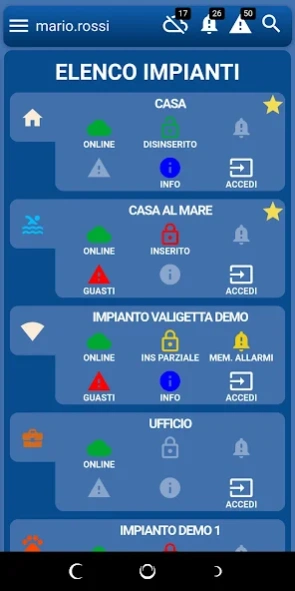
The app opens to an intuitive home page with a list of all associated control panels and key information (connection status, alarms or faults, arming status). To perform any operation, you must access the system by entering a valid access code. If fingerprint or face recognition is available, you can validate access this way.
System management is divided into the following sections:
- Areas: displays the status of the areas into which the system is divided and allows you to perform total or partial arming or disarming operations. You can also recall up to 8 custom scenarios, allowing you to perform multiple arming, disarming, and output commands simply by pressing the appropriate button.
- Zones: Displays a list of the system's zones with their operating information (e.g., opening, exclusion, alarm). Zones can be excluded or reinserted.
- Events: Displays a list of the latest events recorded on the system, with their details. The list can be exported and searched by date or keyword.
- Commands: Lists the system's outputs and allows you to send commands to them for true home automation management.
- Video: If the SUDEL VIDEOBOX is installed on the system, you can view live video from one or more channels of a compatible DVR or IP camera and receive notifications with photos or videos following events detected by the device's onboard video analytics.
- System: Displays a list of all system components with their operating status.
- Tools: Offers a set of diagnostic features, such as placing the control panel in maintenance mode or blocking the dialer.
- Info: Summarize key system and connection information.
- Options: Allows you to customize a wide range of parameters, both aesthetic (e.g., the color and icon displayed on the home page) and functional (e.g., scenario and camera configuration). Last but not least, you can enable and configure push and email notifications. Each user can set all these parameters as desired for each of their associated systems.
Push notifications allow you to receive alerts directly on the device on which the Sudel Cloud app is installed, even if you are not currently using it. You can configure notifications to be received based on a variety of conditions (e.g., alarms, faults, area arming or disarming) and customize the sound that accompanies the notification.
About Sudel Cloud
The company that develops Sudel Cloud is Sudel Next srl. The latest version released by its developer is 1.0.
To install Sudel Cloud on your Android device, just click the green Continue To App button above to start the installation process. The app is listed on our website since 2026-09-28 and was downloaded 0 times. We have already checked if the download link is safe, however for your own protection we recommend that you scan the downloaded app with your antivirus. Your antivirus may detect the Sudel Cloud as malware if the download link to sudel.Cloud is broken.
How to install Sudel Cloud on your Android device:
- Click on the Continue To App button on our website. This will redirect you to Google Play.
- Once the Sudel Cloud is shown in the Google Play listing of your Android device, you can start its download and installation. Tap on the Install button located below the search bar and to the right of the app icon.
- A pop-up window with the permissions required by Sudel Cloud will be shown. Click on Accept to continue the process.
- Sudel Cloud will be downloaded onto your device, displaying a progress. Once the download completes, the installation will start and you'll get a notification after the installation is finished.
Program Details
System requirements
Download information
Pricing
Version History
version
posted on 2026-09-28
bugfix e miglioramento performance
version
posted on 2026-05-19
aggiunta di una nuova funzionalità che mostra le ultime notifiche in elenco impianti
version
posted on 2026-03-02
App riscritta per migliorarne prestazioni e possibilità di aggiornamenti
version
posted on 2025-11-06
Bugfix e ottimizzazioni
version
posted on 2023-10-16
bugfix
Disclaimer
Official Google Play Link
We do not host the Sudel Cloud app on our servers. We did not scan it for viruses, adware, spyware or other type of malware. This app is hosted by Google and passed their terms and conditions to be listed there. We recommend caution when installing it.
The Google Play link for Sudel Cloud is provided to you by apps112.com without any warranties, representations or guarantees of any kind, so access it at your own risk.
If you have questions regarding this particular app contact the app developer directly. For questions about the functionalities of the apps112.com website, contact us.
